If you decide to translate your website, you are opening a door to a new world of users. But just “translating the text” is not enough for Google.
To rank in other languages, you need to speak the language of search engines. That language consists of three difficult technical terms:Hreflang tags, Canonical tags, andMeta tags.
If you ignore them, or worse, implement them incorrectly, Google might penalize your site. You could lose your existing traffic instead of gaining new visitors.
Let’s break down what these are, why they matter, and how to fix them automatically.
1. What is an Hreflang tag?
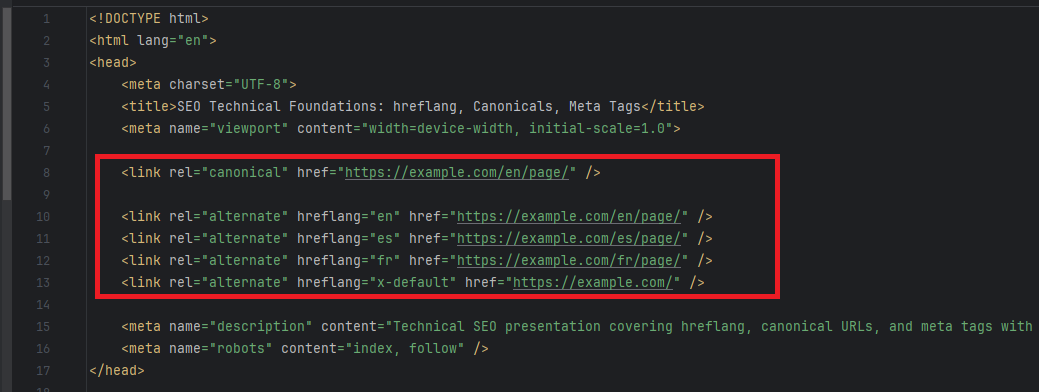
Thehreflangattribute is a signal to Google that tells it: “Hey, this specific page is a translated version of that other page.”
It looks like this in your HTML code:
Why it is critical
Without hreflang tags, Google sees two pages with similar content but different languages. It might get confused about which one to show to a user in Spain or France. Even worse, it might treat them as “duplicate content” if the translation is not perfect or if the structure looks too similar.
With proper hreflang tags, you explicitly tell Google: “Show the English version to users in the UK, and the Spanish version to users in Mexico.”
The “x-default” Tag
There is a special version of this tag calledx-default. It is used for users whodo notmatch any of the specific languages you listed.
This acts as a “fallback” page. If a user comes from a country where you don’t have a translation (e.g., Japan), Google will show them thisx-defaultpage (usually your English version or a country selector page). It is crucial for not losing traffic from unexpected regions.
2. What is a Canonical tag?
Acanonicaltag tells search engines which URL is the “master” or “original” version of a page. This is used to avoid duplicate content penalties.
The trap for translated sites
A common mistake is leaving thecanonicaltag pointing to the original English page, even on the Spanish version.
If your Spanish page atexample.com/es/page/has a canonical tag pointing toexample.com/page/(the English version), you are effectively telling Google: “Don’t index this Spanish page. It’s just a duplicate. Rank the English one instead.”
Result:Your translated pages will never appear in search results. Each language version must point to itself as the canonical version.
3. Meta Tags (Title and Description)
You know that theTitleandMeta Descriptionare what users see in search results.
If you translate your page content but leave the Title and Description in English, you will have a disaster.
- Low Click-Through Rate (CTR):A Spanish user searches for “zapatos baratos” (cheap shoes) but sees an English title “Cheap Shoes”. They won’t click.
- Bad Keyword Ranking:Google won’t know your page is relevant for Spanish keywords if the title is still in English.
Your translation solution must translate these hidden tags, not just the visible body text.
4. The HTML Lang Attribute (Page General Language)
This is one of the most basic but often overlooked tags. At the very top of your code, your website declares its language:
If you translate your content to Spanish but keep, you are sending a conflicting signal. You are telling browsers and spell-checkers: “This text is English,” even though the words are Spanish.
Why it matters:
- Accessibility:Screen readers for blind users use this tag to know which voice accent to use. Reading Spanish text with an English accent sounds terrible and is unusable.
- Browser Translation:Chrome uses this to ask “Do you want to translate this page?” If it’s already marked as the user’s language, Chrome won’t annoy them with that popup.
Our tool automatically switches this attribute to(or any other language) instantly when the user simplifies the language.
The Technical Nightmare: Subdirectories vs. Parameters
There are two main ways to structure URLs for translations:
1. Subdirectories (The Best Way)
https://example.com/es/about-us
This is the gold standard for SEO. It looks like a clean, separate section of your site. Google loves this structure.
2. URL Parameters (The Hard Way)
https://example.com/about-us?language=es
This is often used by dynamic or JavaScript-based translation tools. Historically, SEO experts advised against this because parameters can be messy.
However, modern SEO handles both if the tags are correct.The problem is generating those tags dynamically.
How to automate this without coding
Implementinghreflang, self-referencingcanonical, and translatingmetatags for every single page in 5+ languages is a massive task. Manual coding often leads to mistakes—like missing a return tag or pointing to a broken URL—which leads to penalties.
There is a simpler way.
Our WordPress plugin and JavaScript snippet handle this completely automatically.
It works with everything
Whether you use subdirectories (like/es/) or just simple query parameters (like?language=es), our tool injects the correct headers into your site.
- Auto-detection:It detects the current language.
- Tag Injection:It dynamically adds the correct
hreflangtags for all available languages. - Canonical Fix:It ensures the canonical tag points to the current specific URL (whether it’s
/es/or?lang=es). - Meta Translation:It translates the Page Title and Meta Description on the fly specifically for that URL.
You don’t need to hire an SEO specialist or developer. You just add the plugin, and newly translated pages are automatically generated and indexed correctly by search engines.
Make your website multilingual
Break language barriers and connect with audiences worldwide. Expand your reach, grow your business, and go global today.
No credit card required