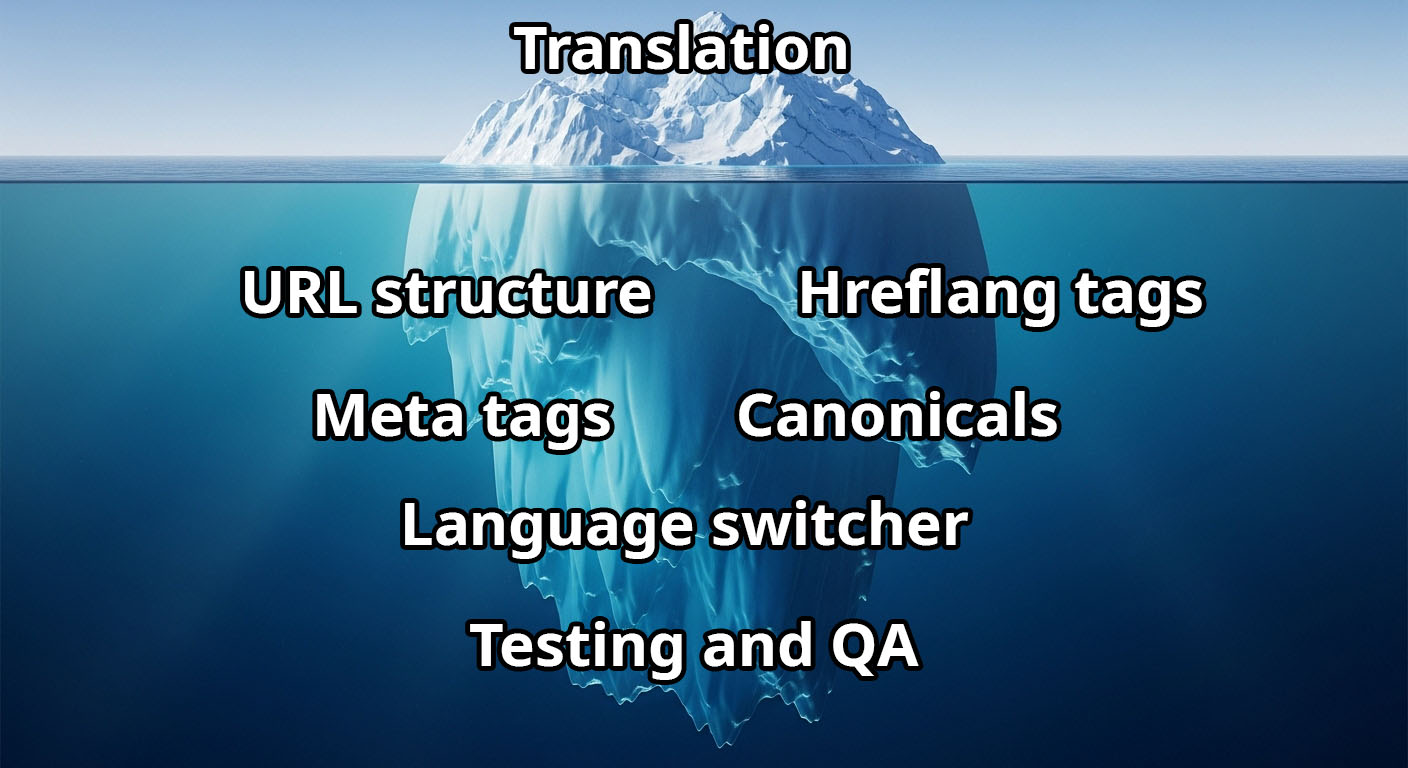
When you think about translating your website, the first thing that comes to mind is probably the cost of hiring professional translators. You ask for a quote, maybe get something like $0.10 to $0.30 per word, and think you have a clear picture of the investment. But here is the problem: translation costs are just the tip of the iceberg.
The real expenses hide beneath the surface in the form of technical implementation work. Even after you pay thousands of dollars for quality translations, your website still won’t work properly for international visitors until someone implements a bunch of technical SEO elements. And that is where things get expensive and time consuming.
Let me break down what most business owners dont realize when they start the localization journey.
The obvious cost: professional translation services
First, lets talk about what everyone knows about. Professional human translation typically costs between $0.08 and $0.30 per word depending on the language pair and subject matter. Some technical or legal content can go even higher.
For a typical business website with around 5,000 words of content, you are looking at:
- English to Spanish: $400 – $1,500
- English to German: $500 – $1,800
- English to Japanese: $800 – $2,500
So if you want to translate your site into just 3 languages, you could easily spend $2,000 to $6,000 just on the text. And this is for basic content. If you have an ecommerce site with hundreds of product descriptions, the costs multiply quickly.
But here is what nobody tells you: getting the translated text back from your translator is only about 30% of the actual work.
1. Creating separate language versions
First, you need to decide on your URL structure. Will you use subdirectories (example.com/es/), subdomains (es.example.com), or separate domains (example.es)? Each approach has pros and cons for SEO.
Then you need to actually build these pages. For a static site, this means duplicating your entire site structure for each language. For a dynamic site, you need to set up a database structure to store multiple language versions and build logic to serve the right content based on user preference.
Developer time: 8-20 hours depending on site complexityAverage cost: $800 – $3,000 (at $100-150/hour for a competent web developer)
2. Implementing hreflang tags
This is where it gets technical. Hreflang tags tell search engines which language version of a page to show to users in different regions. Without them, Google might show your English page to Spanish speakers or vice versa. Even worse, search engines might think your translated pages are duplicate content and penalize your rankings.
Here is what proper hreflang implementation looks like in your HTML head section:

Every single page on your site needs these tags. And here is the tricky part: they must be reciprocal. If your English page links to the Spanish version, the Spanish page must link back to the English version. Miss one tag on one page, and you create errors that confuse search engines.
For a 50-page website with 3 languages, you need to manually add and verify 200+ hreflang tags (50 pages × 4 tags per page). And every time you add a new page or a new language, you need to update the tags on all existing pages.
Developer time: 4-8 hours for initial setup, ongoing maintenance for each new pageAverage cost: $400 – $1,200
3. Setting up canonical tags correctly
Canonical tags tell search engines which version of a page is the “main” one when you have similar or duplicate content. In a multilingual site, each language version should have a self-referencing canonical tag pointing to itself.
This sounds simple, but it gets complicated fast. Many content management systems automatically generate canonical tags that point to a “default” language, which completely breaks your international SEO. You need to modify your CMS templates or install plugins to handle this correctly.

Developer time: 3-6 hoursAverage cost: $300 – $900
4. Translating and implementing meta tags
Your page titles and meta descriptions also need translation. These are critical for SEO because they appear in search results and affect your click-through rates.
But here is the catch: you cannot just directly translate them. Meta titles should be 50-60 characters, and meta descriptions should be 150-160 characters. Different languages have different word lengths. “Free Shipping” is 13 characters in English but “Envío Gratis” is 14 characters in Spanish. Longer languages like German or Finnish might need significant rewriting to fit.
For each page, you need to:
- Translate the meta title and description
- Check the character count
- Rewrite if needed to fit length limits
- Implement them in your HTML
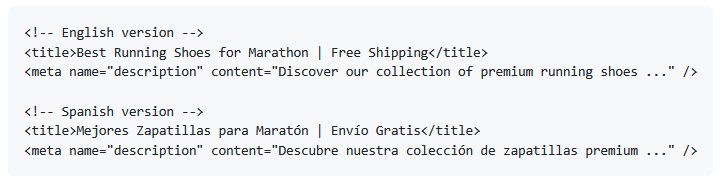
Developer time: 2-4 hours for setup, plus additional translation costs for all meta contentAverage cost: $200 – $600 plus translation fees
5. Building a language switcher
Users need a way to change languages on your site. This means designing and coding a language switcher that:
- Detects the user’s current language
- Remembers their language preference (usually with cookies or local storage)
- Redirects them to the equivalent page in their chosen language
- Works on every page of your site
- Looks good on both desktop and mobile
// Example of language switching logic
function switch_language(new_lang) {
    // Save preference
    localStorage.setItem('preferred_language', new_lang);

    // Get current page path
    let current_path = window.location.pathname;

    // Replace language code in URL
    let new_path = current_path.replace(/^\/(en|es|de)\//, '/' + new_lang + '/');

    // Redirect to new language version
    window.location.href = new_path;
}
Developer time: 8-32 hoursAverage cost: $400 – $1,200
6. Testing everything
After all this implementation, you need to thoroughly test:
- All hreflang tags are correct and reciprocal
- Canonical tags point to the right URLs
- Meta tags display correctly in search results
- The language switcher works on all pages
- No broken links between language versions
- Special characters display correctly in all languages
Professional testing across multiple devices and browsers takes time.
QA time: 4-6 hoursAverage cost: $300 – $800
The total real cost of manual localization
Let me add this up for a typical small business website (50 pages, 5,000 words) translated into 3 languages:
| Cost Item | Price Range |
|---|---|
| Professional translation (3 languages) | $2,000 – $6,000 |
| Building language versions | $800 – $3,000 |
| Implementing hreflang tags | $400 – $1,200 |
| Setting up canonical tags | $300 – $900 |
| Translating meta tags | $200 – $600 |
| Building language switcher | $400 – $1,200 |
| Testing and QA | $300 – $800 |
| TOTAL | $4,400 – $13,700 |
And this does not include:
- Ongoing maintenance costs every time you update content
- Additional developer time when you add new pages
- Costs of fixing errors that inevitably appear
- Time spent coordinating between translators and developers
Most businesses budget for the translation costs but get shocked when they realize the technical implementation can cost 2x to 3x more than the translations themselves.
Now imagine a different approach.
Instead of months of coordination between translators, developers, and QA teams, youadd a single lineof JavaScript code to your website:

Done. Your website is now multilingual.
The automated solution handles everything I just described:
- Translations: Automatic translation with the ability to edit and refine any text
- Hreflang tags: Automatically generated and kept in sync across all pages
- Canonical tags: Properly implemented without touching your CMS
- Meta tags: Titles and descriptions automatically translated and optimized for length
- Language switcher: Fully customizable design that matches your brand
- URL structure: Clean URLs for each language version
- SEO optimization: All technical SEO elements implemented correctly from day one
Time to implement: 10 seconds -few minutes.Cost: A simple monthly subscription starting from$9.99 instead of thousands in upfront costs Maintenance: Zero. Updates happen automatically.
The bottom line
Manual website localization seems straightforward until you realize that translation is just the beginning. The technical implementation work required to make your multilingual site actually function correctly for users and search engines is extensive, time consuming, and expensive.
For most businesses, the hidden costs of custom localization are not worth it when automated solutions can deliver the same results in minutes instead of months. You get proper hreflang implementation, canonical tags, translated meta tags, and a customizable language switcher without hiring a developer or learning any technical SEO.
Make your website multilingual
Break language barriers and connect with audiences worldwide. Expand your reach, grow your business, and go global today.
No credit card required