Launching a new website is an exciting moment, but it can also be risky. If you don’t set up your technical foundation correctly from day one, you might wait months for Google to even find your pages.
SEO is not just about writing good blog posts; it is about making sure search engines can read, understand, and trust your site. Here are the necessary technical steps every new website must follow to rank well.
Security and preferred domains
The first thing a search engine looks for is whether your site is safe for users.
HTTPS is mandatory.You must have an SSL certificate installed. Sites using HTTP are marked as “Not Secure” by browsers, which kills your rankings and your user trust instantly.
You also need to choose a preferred domain. Decide if your address will bewww.example.comor justexample.com. To avoid “duplicate content” issues, you must force all traffic to one version using a 301 redirect.
If you are using anApache server, add this to your.htaccessfile:
RewriteEngine On
RewriteCond %{HTTP_HOST} ^example\.com [NC]
RewriteRule ^(.*)$ https://www.example.com/$1 [L,R=301]
If you are usingNginx, add this to your server configuration block:
server {
    listen 80;
    server_name example.com www.example.com;
    return 301 https://www.example.com$request_uri;
}

server {
    listen 443 ssl;
    server_name example.com;
    return 301 https://www.example.com$request_uri;
}
Crawlability and clear indexing
You need to tell search engine bots (crawlers) exactly which parts of your site they are allowed to see and which pages are the most important.
The robots.txt file
Create arobots.txtfile in your root folder. This file is like a map for bots. It tells them to stay away from private areas like your admin panel.

XML Sitemaps
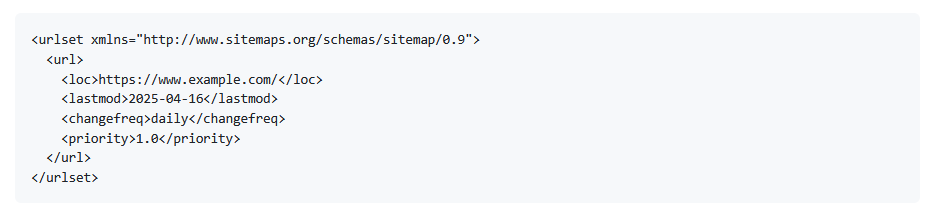
An XML sitemap is a list of all your important URLs. It helps Google find your new pages much faster. A standard sitemap entry looks like this:
If you are usingWordPressor another popular CMS, you do not need to build this file manually. Most modern SEO plugins (such asYoast SEO, Rank Math, orAll in One SEO) will generate your sitemap automatically every time you publish a new page. This ensures your list of URLs stays updated without you ever having to touch a line of code.
Canonical tags
If you have similar content on different pages, search engines might get confused. Use a “canonical” tag to tell them which version is the “master” copy. Add this to theof your page:

How to write high-quality content and use keywords
In the past, people tried to “trick” search engines by repeating the same keyword dozens of times. Today, that will actually get your site penalized. Search engines are much smarter now—they care aboutsearch intent.
Understand search intent
Before you write a single word, ask yourself why the user is searching. Are they looking for information, trying to find a specific site, or ready to buy something?
- Informational:Write clear guides and answer “how-to” questions.
- Transactional:Focus on product benefits and clear “Buy Now” buttons.
Strategic keyword placement
You should integrate your primary keyword naturally. Do not force it. The best places to put your main keyword are:
- In thepage title(as close to the beginning as possible).
- In thefirst 100 wordsof your article.
- In at least onesubheading(H2 or H3).
- In theURL(e.g.,
example.com/how-to-fix-leaks). - In theAlt textof your images.
Instead of just repeating one word, use related terms. If you are writing about “digital marketing,” also use terms like “online advertising,” “SEO,” and “social media strategy.” This helps search engines understand the context of your page.
Building authority with backlinks
A backlink is when another website links to yours. In the eyes of search engines, every link is like a “vote” for your site. The more quality votes you have, the more authority you gain, and the higher you will rank.
Why quality matters more than quantity
Many new website owners make the mistake of buying thousands of cheap links. This is a very bad idea that can lead to your site being banned from search results.
Search engines care about the quality of the link:
- Authority:One link from a very famous and trusted website is worth more than ten thousand links from unknown blogs.
- Relevance:If your website is about “cooking,” a link from a food blog is much more valuable than a link from a car dealership.
How to get your first backlinks
For a new website, getting links is difficult because nobody knows you yet. You can start with these practical steps:
- Create “link magnets”:Write a very detailed guide, perform a original research, or create a free tool. If your content is the best on a specific topic, people will naturally link to it as a source.
- Guest posting:Write a high-quality article for another blog in your industry. In exchange, they will usually let you include one link back to your site.
- Fix broken links:Find old articles in your industry that have broken links. Contact the owner and suggest your new, working article as a replacement.
- Business directories:If you have a local business, ensure you are listed in trusted directories like Google Business Profile, Yelp, or industry-specific catalogs.
Building links is a slow process, but it is the most powerful way to show search engines that your website represents a real authority in its field.
Content hierarchy and metadata
Google reads your page structure to understand what the content is about. Usesemantic HTMLtags correctly. You should only have oneh1tag per page for your main title. Useh2andh3tags for subheadings.
How to use meta tags for maximum visibility
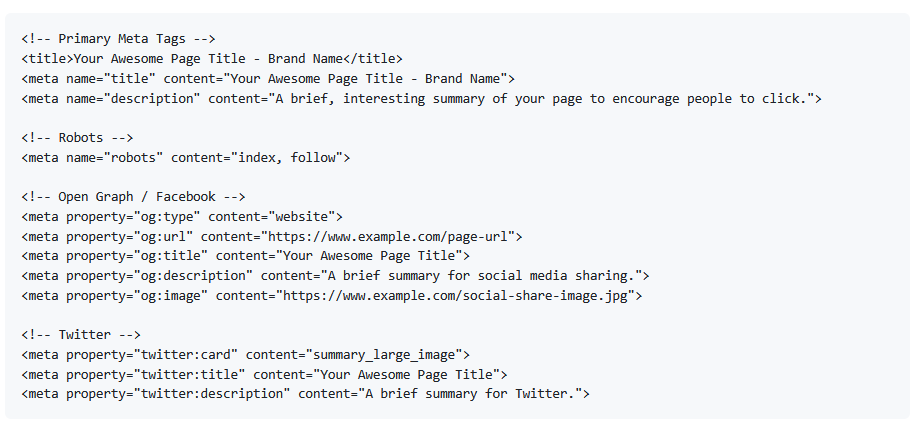
Meta tags are snippets of code that tell search engines and social media platforms what your page is about. They do not appear on the page itself, but they are critical for your “click-through rate.”
Essential SEO meta tags
- Title tag:This is the most important tag. Keep it under60 charactersso it does not get cut off in search results. Put your most important keyword first.
- Meta description:This is your sales pitch. Keep it under160 characters. It should tell the user exactly what they will get if they click your link.
- Robots tag:This tells search engines if they should index the page or follow the links on it.
Social media optimization (Open Graph)
When someone shares your link on Facebook or LinkedIn, “Open Graph” tags tell the platform which image and title to show. If you do not include these, the platform might pick a random, ugly image from your site.
Here is a complete sample of essential meta tags you should include in yoursection:
Performance and user experience
Google uses a set of metrics calledCore Web Vitalsto measure how fast and stable your site is. Your goal is to make the site feel fast for real humans, not just bots.
Image optimization and lazy loading
Large images are the biggest reason for slow websites. Use modern formats likeWebPinstead of heavy JPEGs. Also, implement “lazy loading” so images only load when the user scrolls down to them.

Mobile-first design
More than half of global web traffic comes from mobile devices. Google now uses “mobile-first indexing,” which means it ranks your site based on how it looks and works on a phone. Ensure your buttons are easy to click and your text is easy to read without zooming.
To make this easier, we highly recommend using a framework likeBootstrap. It is the most popular CSS framework in the world and is built for mobile-first projects from the start. It handles the complicated parts of responsive design automatically, making it very simple for developers to create sites that work perfectly on every screen.
Helping search engines with schema
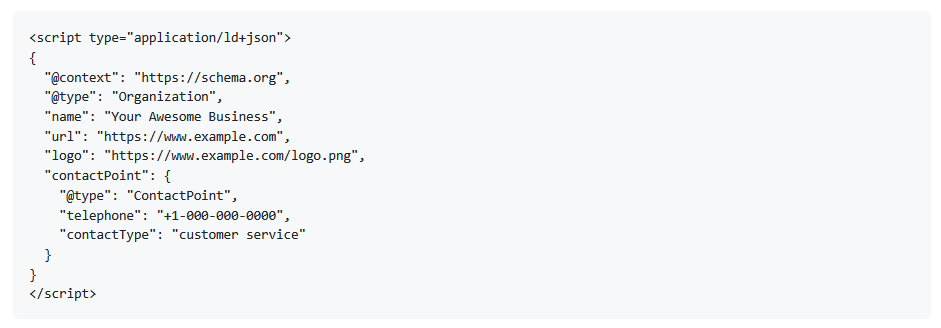
You can help search engines understand your business by usingStructured Data(Schema markup). This can lead to “rich snippets,” which are the special star ratings or price info you see in search results.
The best way to do this is using theJSON-LDformat. Here is a sample for a basic organization:
Essential tools for monitoring
You cannot improve what you do not measure. As soon as your site is live, set up these two free tools:
- Google Search Console:This tells you if there are any errors on your site and which keywords are bringing people from Google.
- Google Analytics 4:This helps you understand how people actually behave once they arrive on your site.
- Google PageSpeed Insights:This tool is essential for identifying exactly what is slowing your site down. It provides a detailed report of technical errors and gives you clear instructions on how to fix them to improve your user experience.
How to tell search engines your site is live
Creating a sitemap is only the first step. You also need to actively tell search engines that it exists so they can start indexing your pages immediately.
The best way to do this is:
- Submit your sitemap to Google Search Console:Once you have verified your website, go to the “Sitemaps” section and paste your sitemap URL. This tells Google exactly where to find your content.
- Use Bing Webmaster Tools:You should also submit your sitemap to Bing. This ensures your website is indexed by Bing and Yahoo, which still account for a significant amount of search traffic.
- Request manual indexing:If you have a specific page that you want to rank as fast as possible, use the “URL Inspection” tool in Google Search Console. You can paste the link and click “Request Indexing” to put that page at the front of the line for crawling.
Next steps: scaling to new markets (optional)
Once you have finished these technical steps, your website will be ready to rank in your local language. If you want to grow even faster, you should consider making your site multilingual.
Translating your content into other languages is one of the biggest “hacks” for SEO because there is often much less competition in non-English results. You can achieve this easily by adding justone line of codeto your website using our translation script. It automatically handles the technical parts of international SEO, like hreflang tags and separate URLs, allowing you to reach an international audience instantly.
Setting up your SEO correctly takes time, but it is the best investment you can make for the long-term success of your project.
Make your website multilingual
Break language barriers and connect with audiences worldwide. Expand your reach, grow your business, and go global today.
No credit card required